BloodConnect Pro Project Walkthrough: Building a Smart Blood Donation Network in Java Android
TL;DR BloodConnect Pro final year project is a Java Android app that creates a smart blood donation platform connecting donors, hospitals, and emergencies with real-time location and notifications. This walkthrough breaks down its architecture, key tech, customization ideas, common mistakes, and viva preparation tips to help you master this blood donation management system confidently.
Building a blood donation android app project like BloodConnect Pro is more than coding — it’s about solving a real-world problem that saves lives by making blood donation faster and smarter. Let’s explore how this smart blood donation platform works under the hood, the technologies behind it, and practical tips to customize and explain the project effectively during your final year viva.
🎯 What problem does BloodConnect Pro solve and why it matters
BloodConnect Pro addresses critical challenges in blood donation and emergency response:
- Bridges the gap between blood donors, hospitals, and emergency recipients, ensuring urgent needs get quick attention.
- Real-time notifications alert local donors instantly using geolocation-based matching to optimize availability.
- Gamification features encourage donors to stay engaged, rewarding regular donations and fostering a supportive community.
These features together build a responsive network that increases the effectiveness of blood donation drives and saves precious time in emergencies.
🛠️ Which technologies and programming languages power BloodConnect Pro
Understanding the technology stack helps you explain your choices clearly in the viva:
- Java is the primary language, chosen for native Android app development to ensure smooth access to device hardware and APIs.
- Google Maps API integrates live maps for users to find nearby hospitals and visualize locations in real time.
- QR code scanning enables fast donor verification at hospitals, while push notification services handle emergency alerts and updates.
This combination balances usability with reliable performance on Android devices common among your batch.
🧠 How is the BloodConnect Pro app architected? Key modules explained
The app’s modular design makes it easier to maintain and extend:
| Module | Features | Purpose |
|---|---|---|
| User module | Donor registration, donation history, leaderboard, QR codes | Manages donor profiles and engagement |
| Hospital module | Inventory tracking, emergency requests, QR code verification | Supports hospital blood supply management |
| Notification system | Geofencing-based emergency alerts and broadcasts | Delivers real-time emergency notifications |
Each module interacts through well-defined interfaces ensuring smooth communication. For example, when a hospital triggers an emergency request, the notification system uses geofencing to alert nearby registered donors instantly.
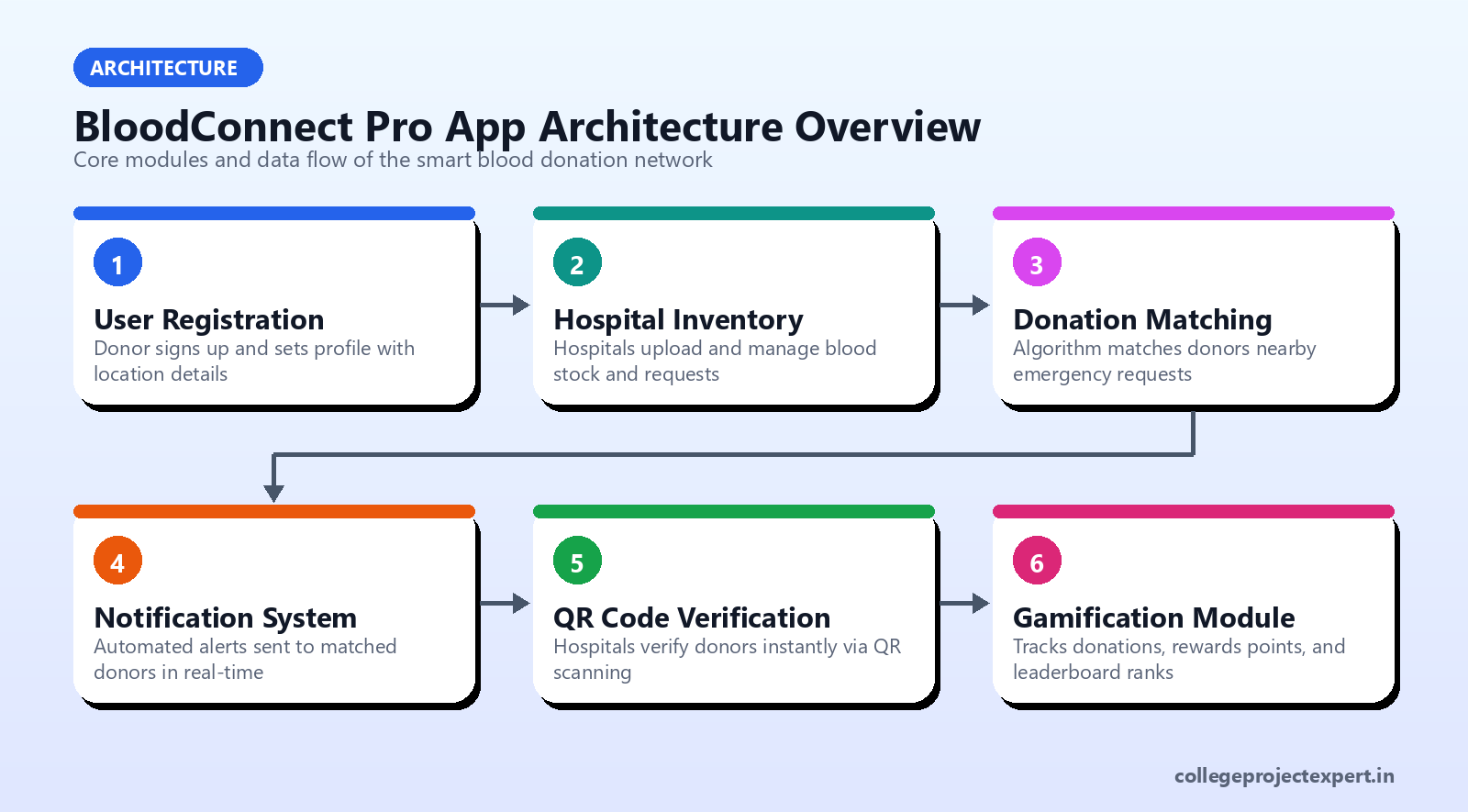
💡 Pro tip: Focus your viva demo on showing user registration, emergency alert broadcast, and QR code scan flows to highlight these key modules.
🚀 How can students customize and extend the BloodConnect Pro project?
This project offers plenty of scope for innovation to showcase your skills:
- Add AI-based donor matching — use machine learning classifiers to predict best-fit donors based on blood group, donation frequency, and location.
- Integrate social media sharing with a reward system for donations to increase community engagement.
- Enhance UI with cross-platform tools like React Native or Flutter to reach iOS users and improve app responsiveness.
Customizations like these not only deepen your understanding but make your project stand out during evaluation.
⚠️ What common mistakes to avoid while working on this project
Avoid these pitfalls to keep your app stable and maintainable:
- Ignoring location permissions handling can cause app crashes; always request and check runtime permissions properly.
- Poor QR code validation may create security loopholes; implement robust scanning and verification logic.
- Monolithic code design makes later modifications tough; keep code modular and reusable for easier enhancements.
⚠️ Common pitfall: Overlooking permission management is a frequent cause of app failure during demo.
✅ How to prepare for the viva: key questions and demo tips
Being confident in your explanation and demo is crucial:
- Explain how the matching algorithm selects donors in emergencies and how notifications are dispatched using geofencing.
- Demonstrate live donor registration, searching nearby hospitals with Google Maps, and triggering an emergency alert.
- Discuss why you chose Java and Google Maps API, and suggest practical improvements like offline mode or AI-based recommendations.
✅ Viva-ready answer: “Our app’s notification system uses BroadcastReceiver linked with geofencing to send instant alerts only to donors within the required radius, improving emergency response times.”
🛠️ Sample Code Snippet: Implementing emergency broadcast notification
Here’s a concise Java snippet using Android’s BroadcastReceiver to send an emergency notification when a geofence event triggers:
public class EmergencyBroadcastReceiver extends BroadcastReceiver {
    @Override
    public void onReceive(Context context, Intent intent) {
        if (GeofenceTransitions.INTENT_ACTION.equals(intent.getAction())) {
            // Extract geofence data
            GeofencingEvent geofencingEvent = GeofencingEvent.fromIntent(intent);
            if (geofencingEvent.hasError()) return;

            int transition = geofencingEvent.getGeofenceTransition();
            if (transition == Geofence.GEOFENCE_TRANSITION_ENTER) {
                sendEmergencyNotification(context);
            }
        }
    }

    private void sendEmergencyNotification(Context context) {
        NotificationCompat.Builder builder = new NotificationCompat.Builder(context, "emergency_channel")
            .setSmallIcon(R.drawable.ic_blood_drop)
            .setContentTitle("Emergency Blood Request")
            .setContentText("Nearby hospital needs urgent donors. Please respond!")
            .setPriority(NotificationCompat.PRIORITY_HIGH);

        NotificationManagerCompat notificationManager = NotificationManagerCompat.from(context);
        notificationManager.notify(1001, builder.build());
    }
}
This example demonstrates clean, practical usage of Android APIs to impress examiners with your grasp of event-driven emergency handling.
FAQ about BloodConnect Pro final year project
Q1: Can I submit this project as it is, or do I need to customize it?
You should understand every module, run your own tests, and customize parts to reflect your learning and originality.
Q2: What tools does this project use for real-time location tracking?
The app uses Google Maps API and Android location services to find hospitals and donors on the map efficiently.
Q3: Does the project support offline mode or emergency fallback?
Currently, it focuses on online notifications. Adding offline fallback features can be a valuable customization.
If you want a ready-made, documented, and viva-supported BloodConnect Pro final year project, check out the detailed page for the Bloodconnect Pro Smart Blood Donation Network Emergency Response Platform. It comes with the full working source code, project report, PPT, and live support to help you succeed.
Also, explore related innovative projects like the Smart Sign Language Detection System With YOLO Mediapipe Multi Modal Recognition Platform to broaden your skills.
Ready to get your hands on this impactful project? Visit College Project Expert today and grab your copy of BloodConnect Pro to start customizing and confidently facing your viva. What customization would you like to add to make your BloodConnect Pro app even smarter? Share your ideas below!
Next step: check out Bloodconnect Pro Smart Blood Donation Network Emergency Response Platform and explore more final-year options on CollegeProjectExpert.in. You can also get in touch.
Related topics: #android #java #projects #education #finalyearproject #blooddonation #softwareengineering #projectdocumentation #viva #customization #mobileapp #opensource #communityservice #maps #notifications
This article was written with AI assistance and grounded in the live College Project Expert catalog.
📌 Official Cross-References & Project Resources:
- Original Publication & Source Code: College Project Expert Official Blog
- Developer Community & Discussion: Read on Dev.to
Originally published at https://collegeprojectexpert.in/blog/bloodconnect-pro-project-walkthrough-building-a-smart-blood-donation-network-in-java-android. More projects: CollegeProjectExpert.in

Comments
Post a Comment